Chat That Stays on Topic
Important info shouldn't drown in 200 messages about last night's match.
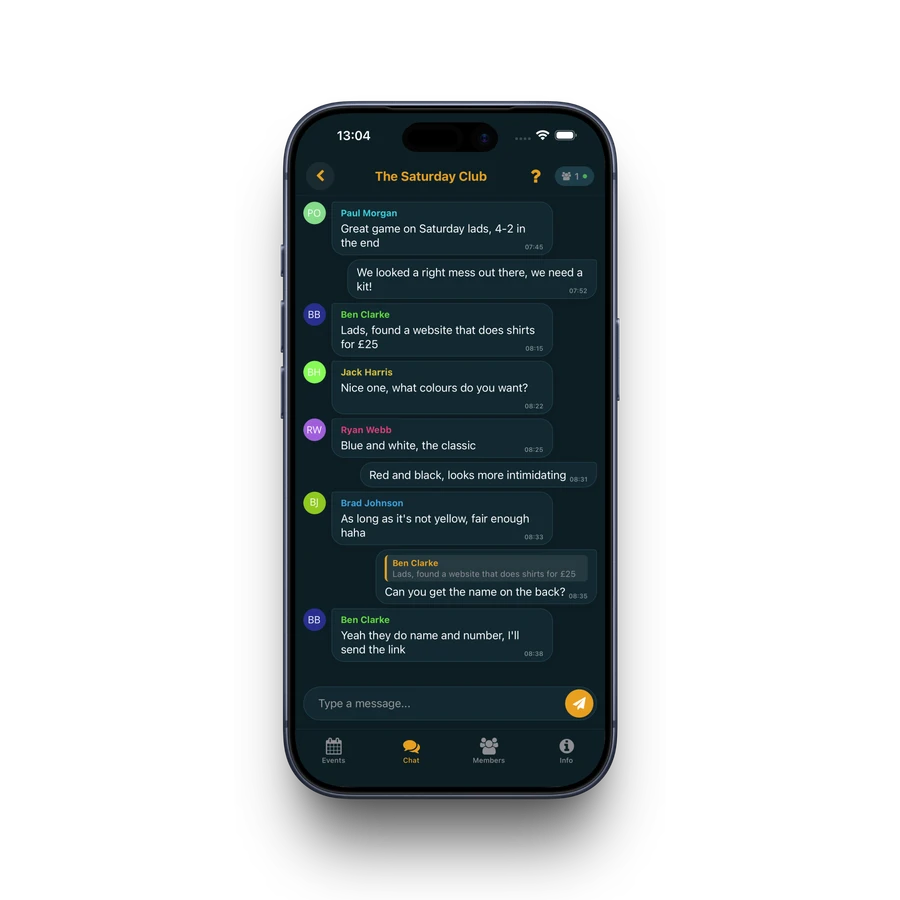
Pivio gives every group and every event its own chat. Pre-match banter stays separate from match details — so nothing gets lost.
WhatsApp chat is chaos
- Match details buried under memes and off-topic banter
- Event-specific discussions mixed into the main group chat
- No way to reply to a specific message thread without confusion
- New members join with zero context — no history, no pinned info, nothing
- Notifications from one chat drown out important updates from another
Every conversation has its place
Group Chat
General discussion for your squad — banter, announcements, and everything in between.
Event Chat
Every event gets its own chat. Discuss logistics for that specific game without cluttering the main group.
Stay in the Loop
Typing indicators, online presence, and inline replies keep conversations flowing naturally.
Chat built for football groups
Group & Event Chats
Every group has a general chat. Every event has its own chat. Discussions stay where they belong.
Inline Replies
Swipe to reply to any message. Keep threaded conversations clear without the noise of quoting entire messages.
Typing Indicators
See who's typing in real time. No more sending a message only to get an instant reply that makes yours irrelevant.
Online Presence
See how many group members are currently in the chat. Know if your message is being read right now.
Event Timeline in Chat
Past events appear inline in your group chat at their chronological position — so you always have context.
Per-Group Muting
Mute specific groups or set a mute duration. Stay in the group without the constant notifications.
Chat FAQ
Is the chat real-time?
Yes — messages are delivered instantly. You'll see typing indicators and online presence just like any modern messaging app.
Can I reply to a specific message?
Yes — swipe right or long-press any message to reply inline. The original message is quoted so everyone can follow the thread.
Do events have separate chats?
Yes — every event automatically gets its own chat. Discuss logistics for that game without cluttering the main group chat.
Can I mute a group?
Yes — long-press a group to mute it for a chosen duration. You can also fine-tune which notification types you receive per group.
Can I send images or files?
Currently, chat supports text messages with inline replies. Media sharing is on the roadmap.
Is this free?
Yes — all chat features are free. No message limits, no premium tiers.
Download Pivio
Download Pivio on the App Store or Google Play and start organising your football group today.